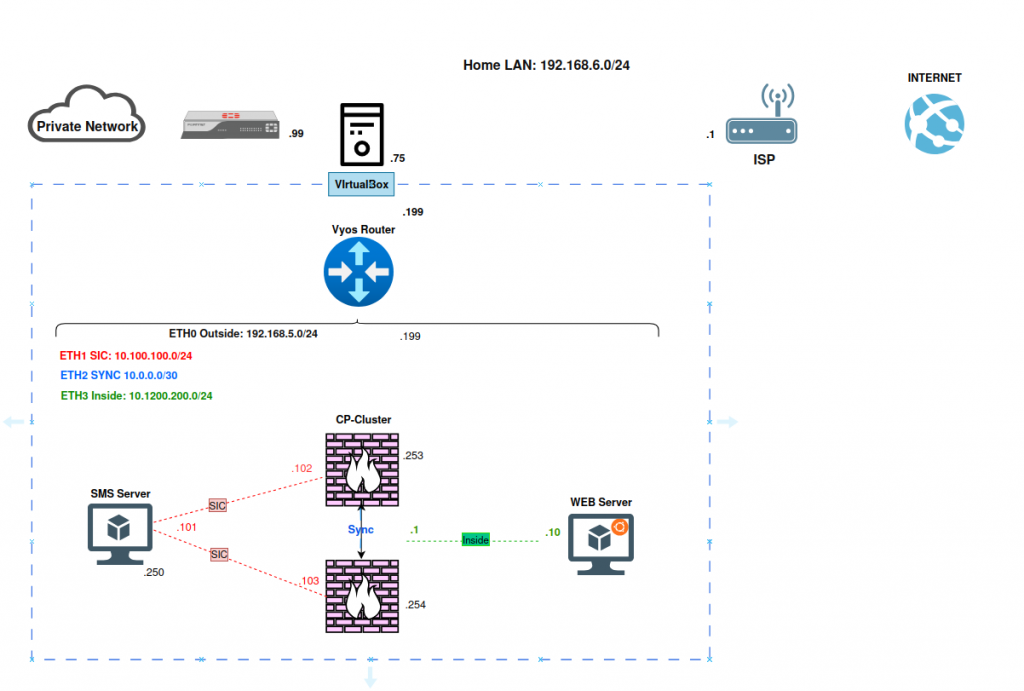
Before touching any Check Point component, it helps to lay out the physical and virtual networking the lab sits on top of:
- Home LAN Network→ ISP router → Internet: standard uplink chain, terminating at a ISP router (
.1) on the home network. - Home LAN : 192.168.6.0/24: the physical network the lab host lives on, with the host machine holding
.75. - VirtualBox host: everything below this line is virtualized. A single physical machine (Windows 11) hosts every VM in the lab, connected through internal VirtualBox networks.
- VyOS Router: acts as the lab’s core router, sitting between the “outside” world and the internal segments. It’s a convenient, free, and lightweight way to route between multiple isolated networks without needing extra physical hardware.
VyOS is configured with two interfaces, each mapped to its own function:
| ETH0 | 192.168.6.0/24 | Home Lan/ uplink toward the home LAN |
| ETH1 | 192.168.5.0/24 | Outside Lab / uplink toward the Checkpoint Lab network |
This one router effectively plays the role of a lab “core,” giving each Check Point network segment its own broadcast domain while still allowing controlled routing between them.
Network Segmentation
This is the part that’s easy to skip in a home lab, but it’s the entire point of the exercise. In a production Check Point deployment, you never want your management traffic, your cluster heartbeat traffic, and your protected user traffic sharing the same wire. Segmentation brings you three things:
- Blast radius control: if the inside network is compromised, an attacker doesn’t automatically have a path to the management plane.
- Predictable failover: cluster sync traffic is latency-sensitive; isolating it from general traffic prevents congestion from causing false failovers.
- Clean policy design: with distinct networks for SIC, Sync, and Inside, security policies can be written in terms of zones rather than a tangle of individual hosts.
In this lab, that segmentation is expressed as four separate subnets, each with a clear job:
- SIC network (10.100.100.0/24) : carries the encrypted control-channel traffic between the SMS and each gateway.
- Sync network (10.0.0.0/30) : a point-to-point link dedicated to state synchronization between the two cluster members.
- Inside network (10.1200.200.0/24) : where protected servers (in this case, a web server) actually live.
- Outside network (192.168.5.0/24) : the uplink toward the home lan and, eventually, the internet.