
This article is based on the Microsoft AZ-700 networking lab M01-Unit8 for configuring global virtual network peering in Azure, adapted to use Ubuntu Linux virtual machines and SSH-based connectivity testing instead of Windows Server virtual machines and Remote Desktop Protocol (RDP). The original Microsoft lab demonstrates how to connect two Azure virtual networks across regions using VNet peering.
The modified version provides a more Linux-oriented workflow that better reflects modern cloud engineering and DevOps environments.
Image 1:
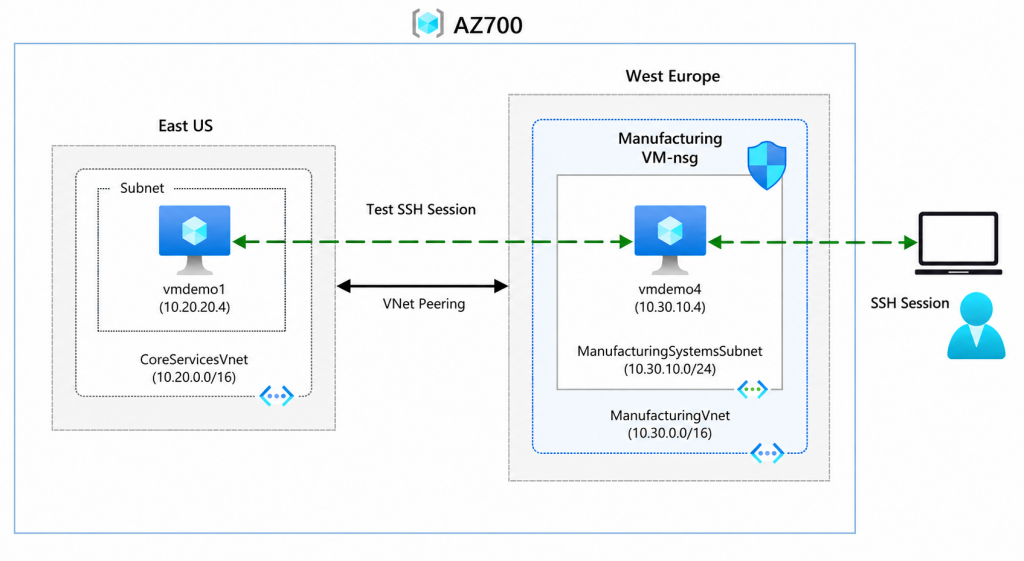
Objective
- Create two Azure Virtual Networks in different Azure regions (or you can reuse them from previous labs).
- Deploy two Ubuntu Linux virtual machines
- Configure Azure Global VNet Peering
- Validate private connectivity using netcat before and after peering
Job skills
- Task 1: Create a Resource-Group (optional)
- Task 2: Create Vnets
- Task 3: Create VMs templates and parameters files
- Task 4: Deploy VMs
- Task 5: Connect to both VM from your local/on-premises system
- Task 6: Create VNet peerings between CoreServicesVnet and ManufacturingVnet
- Task 7: Test again the connection between the VMs
- Task 8: Cleanup (Important for Cost Control)
Task 1: Create a Resource-Group (optional)
Login to Azure subscription from powershell
Connect-AzAccount This command opens a browser window for authentication. Sign in with your Azure credentials. After successful authentication, you’ll see your subscription details in Power Shell
Once logged into your Azure subscription, you can create a resource group that will contain all resources required for this lab.
New-AzResourceGroup -Name AZ700 -Location "eastus"Task 2: Create Vnets
You can find the ARM template and the parameters files on the previous LAB M01-Unit4.
Task 3: Create VMs templates and parameters files
To automate the environment creation and ensure deployment consistency, the virtual machines and networking resources were deployed using an Azure Resource Manager (ARM) template.
The deployment was divided into:
- 1 ARM template
- 2 parameter files
This approach allows reusable infrastructure-as-code (IaC) deployments while maintaining flexibility between VM configurations.
A) ARM Template
You can reuse it for multiple VM deployments. Eventually you can readjust or remove the “Tags” section if you would like to use it on your own Azure environment.
"$schema": "http://schema.management.azure.com/schemas/2015-01-01/deploymentTemplate.json#",
    "contentVersion": "1.0.0.0",
    "parameters": {
        "location": {
            "type": "string"
        },
        "networkInterfaceName": {
            "type": "string"
        },
        "networkSecurityGroupName": {
            "type": "string"
        },
        "networkSecurityGroupRules": {
            "type": "array"
        },
        "subnetId": {
            "type": "string"
        },
        "virtualNetworkId": {
            "type": "string"
        },
        "publicIpAddressName": {
            "type": "string"
        },
        "publicIpAddressType": {
            "type": "string"
        },
        "publicIpAddressSku": {
            "type": "string"
        },
        "pipDeleteOption": {
            "type": "string"
        },
        "virtualMachineName": {
            "type": "string"
        },
        "virtualMachineComputerName": {
            "type": "string"
        },
        "virtualMachineRG": {
            "type": "string"
        },
        "osDiskType": {
            "type": "string"
        },
        "osDiskDeleteOption": {
            "type": "string"
        },
        "virtualMachineSize": {
            "type": "string"
        },
        "nicDeleteOption": {
            "type": "string"
        },
        "hibernationEnabled": {
            "type": "bool"
        },
        "adminUsername": {
            "type": "string"
        },
        "adminPassword": {
            "type": "secureString"
        },
        "enablePeriodicAssessment": {
            "type": "string"
        }
    },
    "variables": {
        "nsgId": "[resourceId(resourceGroup().name, 'Microsoft.Network/networkSecurityGroups', parameters('networkSecurityGroupName'))]",
        "subnetRef": "[parameters('subnetId')]",
        "vnetId": "[parameters('virtualNetworkId')]",
        "vnetName": "[last(split(variables('vnetId'), '/'))]"
    },
    "resources": [
        {
            "name": "[parameters('networkInterfaceName')]",
            "type": "Microsoft.Network/networkInterfaces",
            "apiVersion": "2022-11-01",
            "location": "[parameters('location')]",
            "dependsOn": [
                "[concat('Microsoft.Network/networkSecurityGroups/', parameters('networkSecurityGroupName'))]",
                "[concat('Microsoft.Network/publicIpAddresses/', parameters('publicIpAddressName'))]"
            ],
            "properties": {
                "ipConfigurations": [
                    {
                        "name": "ipconfig1",
                        "properties": {
                            "subnet": {
                                "id": "[variables('subnetRef')]"
                            },
                            "privateIPAllocationMethod": "Dynamic",
                            "publicIpAddress": {
                                "id": "[resourceId(resourceGroup().name, 'Microsoft.Network/publicIpAddresses', parameters('publicIpAddressName'))]",
                                "properties": {
                                    "deleteOption": "[parameters('pipDeleteOption')]"
                                }
                            }
                        }
                    }
                ],
                "networkSecurityGroup": {
                    "id": "[variables('nsgId')]"
                }
            },
            "tags": {
                 "Lab": "M01-Unit 8"
            }
        },
        {
            "name": "[parameters('networkSecurityGroupName')]",
            "type": "Microsoft.Network/networkSecurityGroups",
            "apiVersion": "2020-05-01",
            "location": "[parameters('location')]",
            "properties": {
                "securityRules": "[parameters('networkSecurityGroupRules')]"
            },
            "tags": {
                 "Lab": "M01-Unit 8"
            }
        },
        {
            "name": "[parameters('publicIpAddressName')]",
            "type": "Microsoft.Network/publicIpAddresses",
            "apiVersion": "2023-06-01",
            "location": "[parameters('location')]",
            "properties": {
                "publicIpAllocationMethod": "[parameters('publicIpAddressType')]"
            },
            "sku": {
                "name": "[parameters('publicIpAddressSku')]"
            },
            "tags": {
                 "Lab": "M01-Unit 8"
            }
        },
        {
            "name": "[parameters('virtualMachineName')]",
            "type": "Microsoft.Compute/virtualMachines",
            "apiVersion": "2024-03-01",
            "location": "[parameters('location')]",
            "dependsOn": [
                "[concat('Microsoft.Network/networkInterfaces/', parameters('networkInterfaceName'))]"
            ],
            "properties": {
                "hardwareProfile": {
                    "vmSize": "[parameters('virtualMachineSize')]"
                },
                "storageProfile": {
                    "osDisk": {
                        "createOption": "fromImage",
                        "managedDisk": {
                            "storageAccountType": "[parameters('osDiskType')]"
                        },
                        "deleteOption": "[parameters('osDiskDeleteOption')]"
                    },
                    "imageReference": {
                        "publisher": "canonical",
                        "offer": "ubuntu-24_04-lts",
                        "sku": "server",
                        "version": "latest"
                    }
                },
                "networkProfile": {
                    "networkInterfaces": [
                        {
                            "id": "[resourceId('Microsoft.Network/networkInterfaces', parameters('networkInterfaceName'))]",
                            "properties": {
                                "deleteOption": "[parameters('nicDeleteOption')]"
                            }
                        }
                    ]
                },
                "securityProfile": {},
                "additionalCapabilities": {
                    "hibernationEnabled": false
                },
                "osProfile": {
                    "computerName": "[parameters('virtualMachineComputerName')]",
                    "adminUsername": "[parameters('adminUsername')]",
                    "adminPassword": "[parameters('adminPassword')]",
                    "linuxConfiguration": {
                        "patchSettings": {
                            "assessmentMode": "[parameters('enablePeriodicAssessment')]",
                            "patchMode": "ImageDefault"
                        }
                    }
                }
            },
            "tags": {
                "Lab": "M01-Unit 8"
            }
        }
    ],
    "outputs": {
        "adminUsername": {
            "type": "string",
            "value": "[parameters('adminUsername')]"
        }
    }
}
B) Vmdemo Virtual Machine parameters File
The external parameter files were designed to support parameterized deployments, allowing customization of VM names, subnet assignments, and IP addressing configurations.
Before starting the deployment, update the parameter file with the following information:
- Your Subscription ID
- Resource Group name (if yours has a different name chooses for this lab)
The same parameter file structure can be reused for all three virtual machines parameters file. You only need to modify the VM-specific values such as:
- VM name (
vmdemo1,vmdemo4) - Public IP resource name
- Network Interface Card (NIC) name
- Network Security Group (NSG) name
- Other dependent resources
vmdemo1parameters.json
{
    "$schema": "https://schema.management.azure.com/schemas/2015-01-01/deploymentParameters.json#",
    "contentVersion": "1.0.0.0",
    "parameters": {
        "location": {
            "value": "eastus"
        },
        "networkInterfaceName": {
            "value": "vmdemo1nc"
        },
        "networkSecurityGroupName": {
            "value": "vmdemo1-nsg"
        },
        "networkSecurityGroupRules": {
            "value": [
                {
                    "name": "SSH",
                    "properties": {
                        "priority": 300,
                        "protocol": "TCP",
                        "access": "Allow",
                        "direction": "Inbound",
                        "sourceAddressPrefix": "*",
                        "sourcePortRange": "*",
                        "destinationAddressPrefix": "*",
                        "destinationPortRange": "22"
                    },

                    "name": "Ping",
                    "properties": {
                        "priority": 310,
                        "protocol": "*",
                        "access": "Allow",
                        "direction": "Inbound",
                        "sourceAddressPrefix": "*",
                        "sourcePortRange": "*",
                        "destinationAddressPrefix": "*",
                        "destinationPortRange": "*"
                }
				}]
        },
        "subnetId": {
            "value": "/subscriptions/your-subscription-id-here/resourceGroups/AZ700/providers/Microsoft.Network/virtualNetworks/CoreServicesVnet/subnets/DatabaseSubnet"
        },
        "virtualNetworkId": {
            "value": "/subscriptions/your-subscription-id-here/resourceGroups/AZ700/providers/Microsoft.Network/virtualNetworks/CoreServicesVnet"
        },
        "publicIpAddressName": {
            "value": "vmdemo1-ip"
        },
        "publicIpAddressType": {
            "value": "Static"
        },
        "publicIpAddressSku": {
            "value": "Standard"
        },
        "pipDeleteOption": {
            "value": "Delete"
        },
        "virtualMachineName": {
            "value": "vmdemo1"
        },
        "virtualMachineComputerName": {
            "value": "vmdemo1"
        },
        "virtualMachineRG": {
            "value": "AZ700"
        },
        "osDiskType": {
            "value": "Standard_LRS"
        },
        "osDiskDeleteOption": {
            "value": "Delete"
        },
        "virtualMachineSize": {
            "value": "Standard_B1s"
        },
        "nicDeleteOption": {
            "value": "Delete"
        },
        "hibernationEnabled": {
            "value": false
        },
        "adminUsername": {
            "value": "azureuser"
        },
        "adminPassword": {
            "value": "yourpassword"
        },
        "enablePeriodicAssessment": {
            "value": "ImageDefault"
        }
    }
}*Removing password authentication entirely would be aligned with the current Azure engineering best practices. For production environments uses SSH key authentication instead
vmdemo4parameters.json
{
    "$schema": "https://schema.management.azure.com/schemas/2015-01-01/deploymentParameters.json#",
    "contentVersion": "1.0.0.0",
    "parameters": {
        "location": {
            "value": "westeurope"
        },
        "networkInterfaceName": {
            "value": "vmdemo4nc"
        },
        "networkSecurityGroupName": {
            "value": "vmdemo4-nsg"
        },
        "networkSecurityGroupRules": {
            "value": [
                {
                    "name": "SSH",
                    "properties": {
                        "priority": 300,
                        "protocol": "TCP",
                        "access": "Allow",
                        "direction": "Inbound",
                        "sourceAddressPrefix": "*",
                        "sourcePortRange": "*",
                        "destinationAddressPrefix": "*",
                        "destinationPortRange": "22"
                    },

                    "name": "Ping",
                    "properties": {
                        "priority": 310,
                        "protocol": "*",
                        "access": "Allow",
                        "direction": "Inbound",
                        "sourceAddressPrefix": "*",
                        "sourcePortRange": "*",
                        "destinationAddressPrefix": "*",
                        "destinationPortRange": "*"
                }
				}]
        },
        "subnetId": {
            "value": "/subscriptions/your-subscription-id-here/resourceGroups/AZ700/providers/Microsoft.Network/virtualNetworks/ManufacturingVnet/subnets/ManufacturingSystemsSubnet"
        },
        "virtualNetworkId": {
            "value": "/subscriptions/your-subscription-id-here/resourceGroups/AZ700/providers/Microsoft.Network/virtualNetworks/ManufacturingVnet"
        },
        "publicIpAddressName": {
            "value": "vmdemo4-ip"
        },
        "publicIpAddressType": {
            "value": "Static"
        },
        "publicIpAddressSku": {
            "value": "Standard"
        },
        "pipDeleteOption": {
            "value": "Delete"
        },
        "virtualMachineName": {
            "value": "vmdemo4"
        },
        "virtualMachineComputerName": {
            "value": "vmdemo4"
        },
        "virtualMachineRG": {
            "value": "AZ700"
        },
        "osDiskType": {
            "value": "Standard_LRS"
        },
        "osDiskDeleteOption": {
            "value": "Delete"
        },
        "virtualMachineSize": {
            "value": "Standard_B1s"
        },
        "nicDeleteOption": {
            "value": "Delete"
        },
        "hibernationEnabled": {
            "value": false
        },
        "adminUsername": {
            "value": "azureuser"
        },
        "adminPassword": {
            "value": "yourpassword"
        },
        "enablePeriodicAssessment": {
            "value": "ImageDefault"
        }
    }
}
Task 4: Deploy VMs
Now you can move to the local directory where you save the json files (template and parameters) that you need for deploy the VMs.
Deploy vmdemo1 (DatabaseSubnet)
New-AzResourceGroupDeployment -name deplvm1 -ResourceGroupName AZ700 -TemplateFile .\template.json -TemplateParameterFile .\vmdemo1parameters.jsonDeploy vmdemo4 (ManufacturingSystemsSubnet):
New-AzResourceGroupDeployment -name deplvm4 -ResourceGroupName AZ700 -TemplateFile .\template.json -TemplateParameterFile .\vmdemo4parameters.jsonTask 5: Connect to both VM from your local/on-premises system
VMs are now up and running on your Azure subscription. All virtual machines will be accessible from the Internet through SSH on port 22
Once connected to vmdemo1 and vmdemo4 over ssh (through Putty, Powershell or another supported terminal) you can test the connection between the two VM placed on different Virtual Networks:
Test ssh (default port 22) connection with netcat (a universal networking utility) from vmdemo4 to vmdemo1
ip address show eth0           # show private ip assigned to the Network Interface Card (vmdemo4nc)
nc -v -w5 10.20.20.4  22            # test network connection over vmdemo1 port 22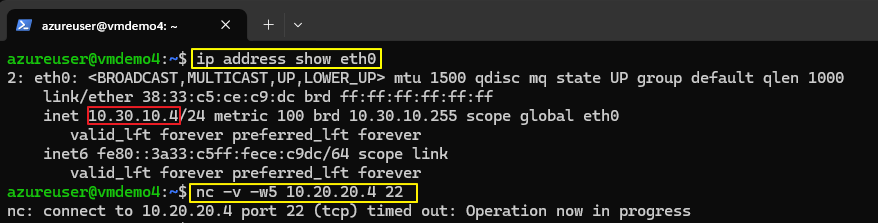
As expected, the connection attempt to TCP port 22 fails because no routing path exists yet between the two virtual networks.
Task 6: Create VNet peerings between CoreServicesVnet and ManufacturingVnet
Azure Virtual Network peering allows two VNets to communicate directly through the Microsoft backbone infrastructure without requiring VPN gateways or public internet routing. Microsoft supports both regional and global VNet peering. Key benefits include low latency and high bandwidth without gateway dependency.
From the Azure portal:
- On the Azure home page, select Virtual Networks, and then select CoreServicesVnet.
- In CoreServicesVnet, under Settings, select Peerings.
- On CoreServicesVnet | Peerings, select + Add.
- Use the information below to create the peering. When finished, select Add.
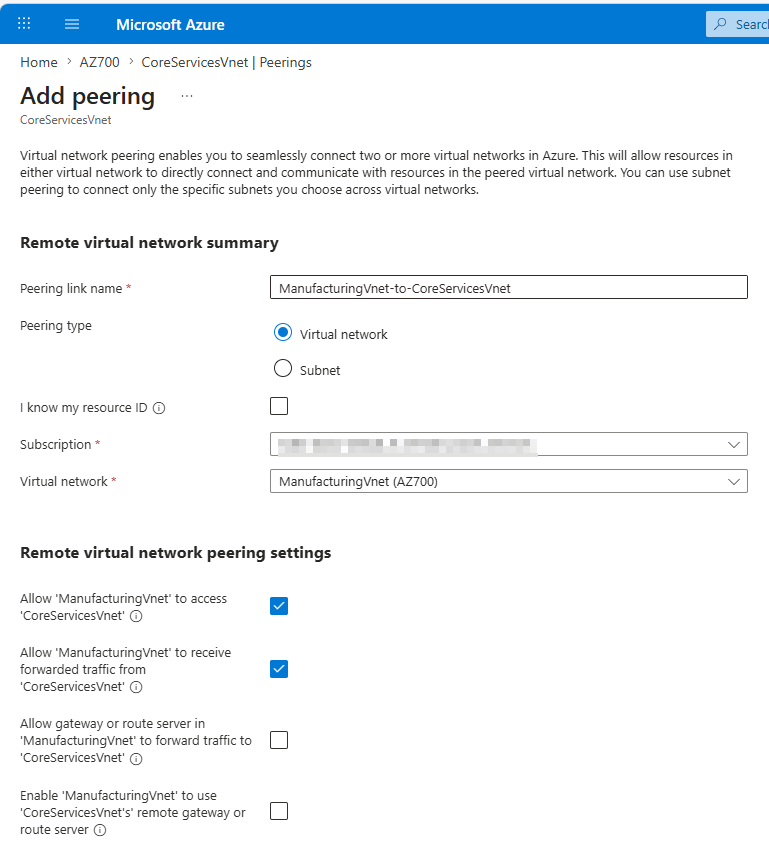
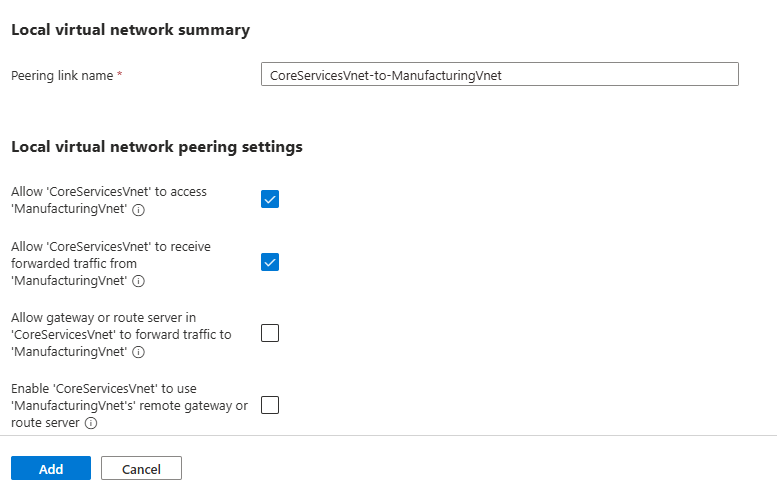
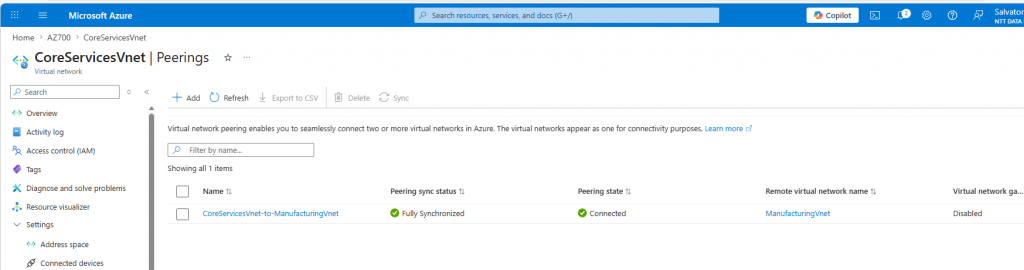
In CoreServicesVnet | Peerings, verify that the CoreServicesVnet-to-ManufacturingVnet peering is Connected.
Task 7: Test again the connection between the VMs
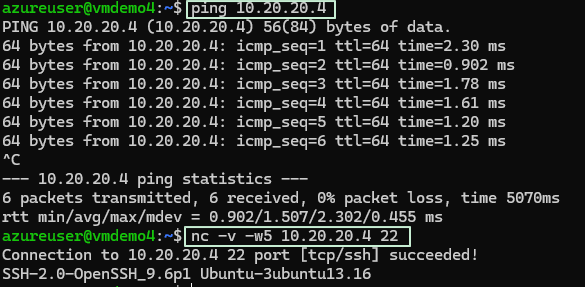
From vmdemo4 (ManufacturingVnet/WestEurope) to vmdemo1 (CoreServicesVnet/EastUS)
from vmdemo1 (CoreServicesVnet/EastUS) to vmdemo4 (ManufacturingVnet/WestEurope)
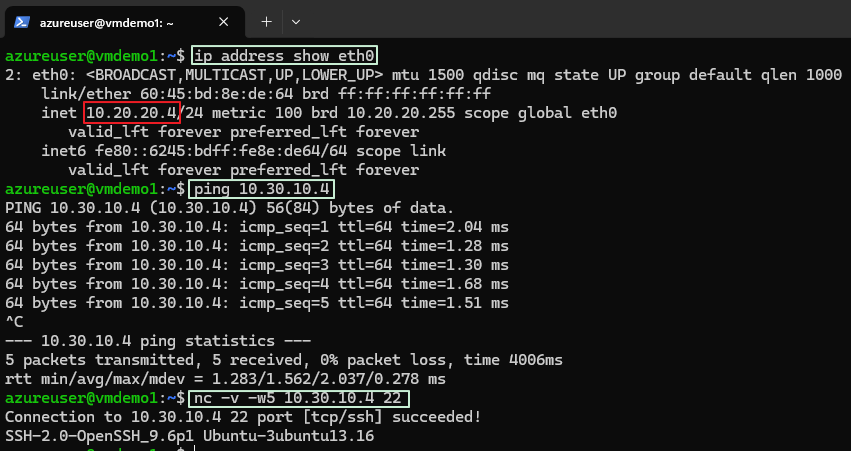
The test connection should succeed on both directions.
Task 8: Cleanup (Important for Cost Control)
After completing the lab, it is recommended to delete the resources you created to avoid unnecessary charges and to keep your Azure environment clean. This step is especially relevant for exam labs and practice environments.
After the Azure login (see above), from Powershell run the command:
Remove-AzResourceGroup -Name "your-resource-group-name" -ForceIt is the fastest and most common cleanup method and reflects real-world administrative practices.
To confirm the resource group has been removed:
Get-AzResourceGroup -Name "your-resource-group-name"If the resource group no longer exists, no output will be returned.
Conclusion
This lab also demonstrates how Azure networking services can be validated using Infrastructure-as-Code (IaC) deployment methods and Linux-native administration tools.
The exercise highlights several important Azure networking concepts:
- Cross-region connectivity
- Private Azure backbone routing
- Low-latency VNet communication
- Network validation using SSH