
This Lab is a variant of the official Microsoft Learning Lab: M01 – Unit 4 Design and implement a Virtual Network in Azure | AZ-700-Designing-and-Implementing-Microsoft-Azure-Networking-Solutions
Exercise scenario
Consider the fictional organization Contoso Ltd, which is in the process of migrating infrastructure and applications to Azure. In your role as network engineer, you must plan and implement three virtual networks and subnets to support resources in those virtual networks.
The CoreServicesVnet virtual network is deployed in the East US region. This virtual network will have the largest number of resources. It will have connectivity to on-premises networks through a VPN connection. This network will have web services, databases, and other systems that are key to the operations of the business. Shared services, such as domain controllers and DNS also will be located here. A large amount of growth is anticipated, so a large address space is necessary for this virtual network.
The ManufacturingVnet virtual network is deployed in the West Europe region, near the location of your organization’s manufacturing facilities. This virtual network will contain systems for the operations of the manufacturing facilities. The organization is anticipating a large number of internal connected devices for their systems to retrieve data from, such as temperature, and will need an IP address space that it can expand into.
The ResearchVnet virtual network is deployed in the Southeast Asia region, near the location of the organization’s research and development team. The research and development team uses this virtual network. The team has a small, stable set of resources that is not expected to grow. The team needs a small number of IP addresses for a few virtual machines for their work.
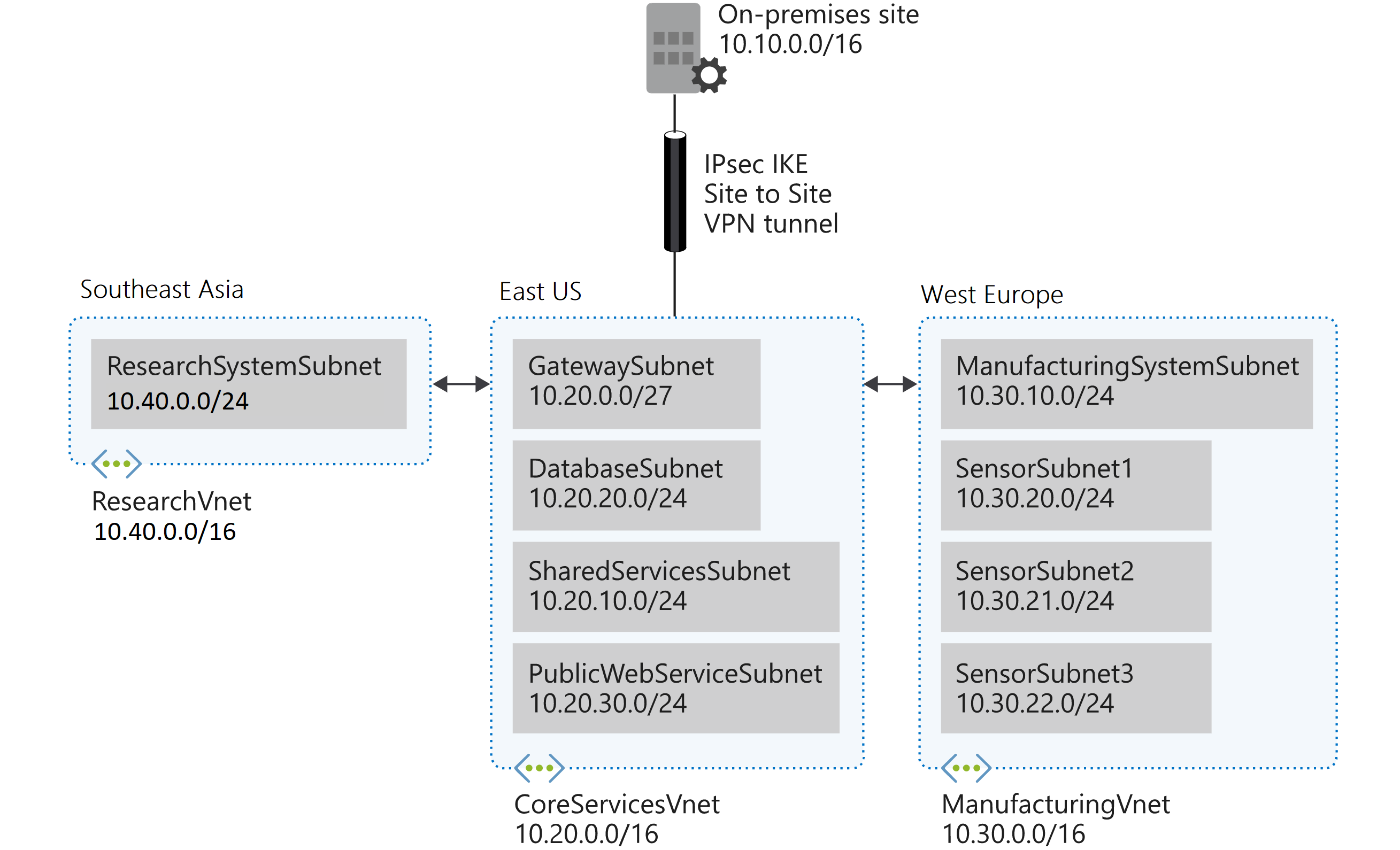
You will create the following resources:
| Virtual Network | Region | Virtual network address space | Subnet | Subnet |
|---|---|---|---|---|
| CoreServicesVnet | East US | 10.20.0.0/16 | ||
| GatewaySubnet | 10.20.0.0/27 | |||
| SharedServicesSubnet | 10.20.10.0/24 | |||
| DatabaseSubnet | 10.20.20.0/24 | |||
| PublicWebServiceSubnet | 10.20.30.0/24 | |||
| ManufacturingVnet | West Europe | 10.30.0.0/16 | ||
| ManufacturingSystemSubnet | 10.30.10.0/24 | |||
| SensorSubnet1 | 10.30.20.0/24 | |||
| SensorSubnet2 | 10.30.21.0/24 | |||
| SensorSubnet3 | 10.30.22.0/24 | |||
| ResearchVnet | Southeast Asia | 10.40.0.0/16 | ||
| ResearchSystemSubnet | 10.40.0.0/24 |
These virtual networks and subnets are structured in a way that accommodates existing resources yet allows for projected growth. Let’s create these virtual networks and subnets to lay the foundation for our networking infrastructure.
What This Lab Covers
The official lab objective is to design and implement a Virtual Network in Azure. Concretely, that means working through Creating and configuring Virtual Networks (VNets) and subnets.
The lab requires you to deploy multiple VNets across different regions with specific IP ranges and subnets. Doing this manually through the Portal is doable, but it’s slow and error-prone. With an ARM Template you can deploy the entire baseline infrastructure in under two minutes, leaving you free to focus on what the exam actually tests: understanding what you deployed and why.
More importantly, this is your introduction to Infrastructure as Code (IaC) in the Azure networking world. The AZ-700 doesn’t test you on ARM Templates directly, but every senior Azure networking role expects you to work with them. Getting comfortable with IaC early makes the whole certification journey — and everything after it — easier.
The core IaC benefits you’ll feel immediately in this lab:
- Speed: Deploy all required VNets and subnets in one operation instead of many portal clicks
- Repeatability: Tear down and redeploy instantly if you need to start fresh
- Documentation: The template is the documentation — the IP ranges, subnet names, and structure are all readable in one place
- Consistency: No typos in CIDR ranges, no forgotten subnets
Login to azure subscription from powershell
Connect-AzAccount
This command opens a browser window for authentication. Sign in with your Azure credentials. After successful authentication, you’ll see your subscription details in Power Shell
Task 1: Create the Lab resource group
Once logged in your Azure subscription, you can create the required resource group that will contain the three Vnets.
New-AzResourceGroup -Name ContosoResourceGroup -Location "eastus"
Task 2: Redact the ARM template
Now you can create the json files (template and parameters) that you need for the Vnets. You can reuse the Template file each time. Instead the parameter file will be redact to fill the Vnet/Subnets requirements. Place the files in a directory on your local system.
A) ARM Template
{
  "$schema": "https://schema.management.azure.com/schemas/2019-04-01/deploymentTemplate.json#",
  "contentVersion": "1.0.0.0",

  "parameters": {
    "vnetName": {
      "type": "string"
    },
    "location": {
      "type": "string"
    },
    "addressSpace": {
      "type": "array"
    },
    "subnets": {
      "type": "array"
    }
  },

  "resources": [
    {
      "type": "Microsoft.Network/virtualNetworks",
      "apiVersion": "2023-09-01",
      "name": "[parameters('vnetName')]",
      "location": "[parameters('location')]",
      "properties": {
        "addressSpace": {
          "addressPrefixes": "[parameters('addressSpace')]"
        }
      }
    },
    {
      "type": "Microsoft.Network/virtualNetworks/subnets",
      "apiVersion": "2023-09-01",
      "name": "[format('{0}/{1}', parameters('vnetName'), parameters('subnets')[copyIndex()].name)]",
      "dependsOn": [
        "[resourceId('Microsoft.Network/virtualNetworks', parameters('vnetName'))]"
      ],
      "copy": {
        "name": "subnetLoop",
        "count": "[length(parameters('subnets'))]"
      },
      "properties": {
        "addressPrefix": "[parameters('subnets')[copyIndex()].addressPrefix]"
      }
    }
  ],

  "outputs": {
    "vnetId": {
      "type": "string",
      "value": "[resourceId('Microsoft.Network/virtualNetworks', parameters('vnetName'))]"
    }
  }
}
B) CoreServicesVnet Parameters file
{
  "$schema": "https://schema.management.azure.com/schemas/2019-04-01/deploymentParameters.json#",
  "contentVersion": "1.0.0.0",

  "parameters": {
    "vnetName": {
      "value": "CoreServicesVnet"
    },
    "location": {
      "value": "eastus"
    },
    "addressSpace": {
      "value": [
        "10.20.0.0/16"
      ]
    },
     "subnets": {
      "value": [
        {
          "name": "GatewaySubnet",
          "addressPrefix": "10.20.0.0/27"
        },
        {
          "name": "SharedServicesSubnet",
          "addressPrefix": "10.20.10.0/24"
        },
        {
          "name": "DatabaseSubnet",
          "addressPrefix": "10.20.20.0/24"
        },
        {
          "name": "PublicWebServiceSubnet",
          "addressPrefix": "10.20.30.0/24"
        }
      ]
    }
  }
}
C) ManufacturingVnet Parameters file
{
  "$schema": "https://schema.management.azure.com/schemas/2019-04-01/deploymentParameters.json#",
  "contentVersion": "1.0.0.0",

  "parameters": {
    "vnetName": {
      "value": "ManufacturingVnet"
    },
    "location": {
      "value": "westeurope"
    },
    "addressSpace": {
      "value": [
        "10.30.0.0/16"
      ]
    },
     "subnets": {
      "value": [
        {
          "name": "ManufacturingSystemSubnet",
          "addressPrefix": "10.30.10.0/24"
        },
        {
          "name": "SensorSubnet1",
          "addressPrefix": "10.30.20.0/24"
        },
        {
          "name": "SensorSubnet2",
          "addressPrefix": "10.30.21.0/24"
        },
        {
          "name": "SensorSubnet3",
          "addressPrefix": "10.30.22.0/24"
        }
      ]
    }
  }
}
C) ResearchVnet Parameters file
{
  "$schema": "https://schema.management.azure.com/schemas/2019-04-01/deploymentParameters.json#",
  "contentVersion": "1.0.0.0",

  "parameters": {
    "vnetName": {
      "value": "ResearchVnet"
    },
    "location": {
      "value": "southeastasia"
    },
    "addressSpace": {
      "value": [
        "10.40.0.0/16"
      ]
    },
     "subnets": {
      "value": [
        {
          "name": "ResearchSystemSubnet",
          "addressPrefix": "10.40.0.0/24"
        }
      ]
    }
  }
}
Task 3: Deploying the Virtual Networks trough ARM Templates
Before launch the commands. move to the local directory who you placed the templates.
Deploy the CoreServicesVnet virtual network and subnets:
New-AzResourceGroupDeployment -name deplvnet1 -ResourceGroupName ContosoResourceGroup -TemplateFile .\M01u4_template.json -TemplateParameterFile .\CoreServicesVnet_parameters.json
Deploy the ManufacturingVnet virtual network and subnets:
New-AzResourceGroupDeployment -name deplvnet2 -ResourceGroupName ContosoResourceGroup -TemplateFile .\M01u4_template.json -TemplateParameterFile .\ManufacturingVnet_parameters.json
Deploy the ResearchVnet virtual network and subnet:
New-AzResourceGroupDeployment -name deplvnet3 -ResourceGroupName ContosoResourceGroup -TemplateFile .\M01u4_template.json -TemplateParameterFile .\ResearchVnet_parameters.json
Task 4: Verify the creation of VNets and Subnets
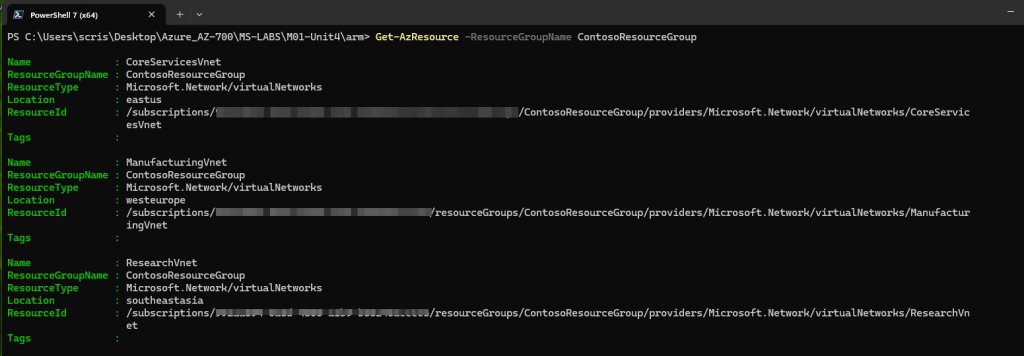
1) Powershell
Get-AzResource -ResourceGroupName ContosoResourceGroup
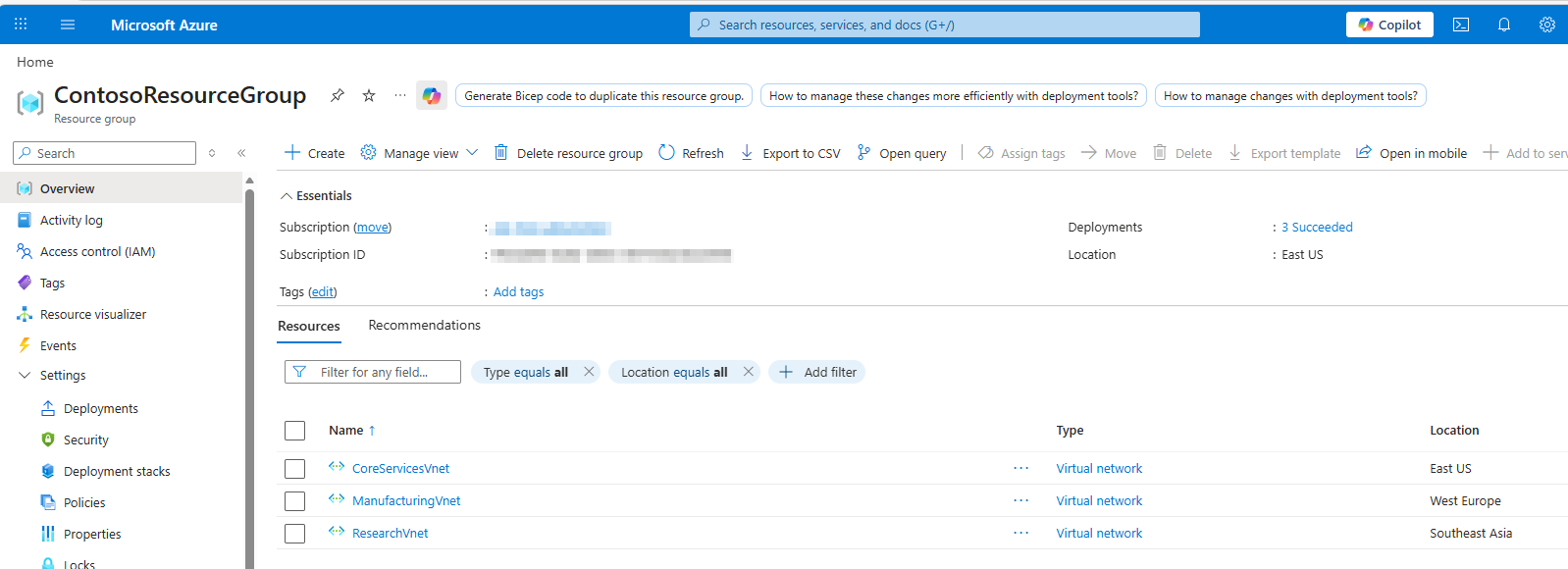
2) Azure Portal
Check Vnets:
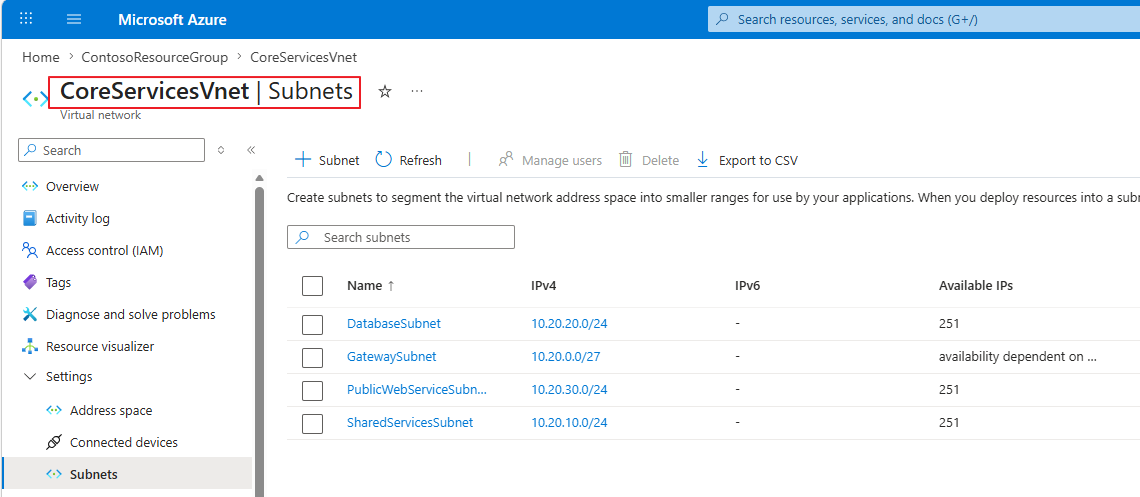
Check CoreServicesVnet subnets:
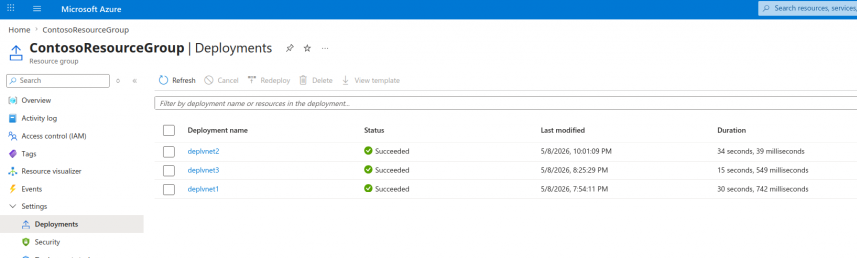
Check deployments:
Conclusion
This lab sets the foundation for the entire AZ-700 journey. By using ARM Templates to deploy the baseline infrastructure, you’ve also taken your first real step into Infrastructure as Code — a practice that will follow you throughout your Azure career.
The key takeaways from this lab:
- Virtual Networks are isolated, and their address spaces must be planned carefully for future connectivity
- Subnets let you segment workloads and apply policies independently
- ARM Templates (and Bicep) let you deploy and redeploy network infrastructure consistently and quickly
The Portal is great for exploration. IaC is how production Azure networking gets built.