
Introduction
AzureSubnetCalculator.ps1 is a powerful and easy-to-use PowerShell tool designed to simplify subnet planning in Microsoft Azure environments.
Azure networking has specific rules regarding reserved IP addresses and usable host calculations, which differ from traditional on-premises networks.
This script helps students, engineers, architects, and administrators quickly calculate subnets that fully respect Azure requirements.
Whether you are designing a new virtual network, planning subnet expansions, or validating an existing cloud architecture — this tool provides accurate, fast, and Azure-compliant subnet information.
Requeriments
You can download the script from my GitHub repository: https://github.com/az104tor/AzureSubnetCalculator
To run it, the following requirements apply:
– Supported Operating Systems
- Windows 10 or Windows 11
- Windows Server 2016 or later
- Linux distributions with PowerShell 7 installed
- macOS with PowerShell 7 installed
– PowerShell Version
Recommended:
- PowerShell 7.0+ (pwsh)
Full ANSI color support and best performance, compatibility.
Minimum:
- Windows PowerShell 5.1
Script runs correctly, but color output may require additional configuration
To enable ANSI colors (optional):
Set-ItemProperty HKCU:\Console VirtualTerminalLevel -Type DWORD 1
– Execution Policy
Because the script is not digitally signed, Windows may block it.
Users must configure PowerShell to allow local scripts:
Set-ExecutionPolicy RemoteSigned # allow always local unsigned scripts
Or allow only this powershell session:
Set-ExecutionPolicy -Scope Process -ExecutionPolicy Bypass #allow temporale the execution of unsigned scripts
Also, when a script is downloaded from the internet, user must umblock the file. Move to the Download directory and run:
Unblock-File -Path .\AzureSubnetCalculator.ps1
– Privileges
No administrative rights are required to run the script. Administrative rights are required only if the user wants to change the execution policy for the system (see above).
– Input Requirements
The script requires a valid IPv4 CIDR (Classless Inter-Domain Routing) notation:
Examples:
10.0.0.0/16
192.168.1.0/24
172.16.10.0/27
Invalid inputs (missing CIDR or malformed IPs) will generate an error. Please refer to RFC 1918 for Best Current Practice.
Script functionalities
1) Calculates all essential subnet details:
- Network address
- Broadcast address
- Subnet mask
- CIDR prefix
- Total hosts (raw IPv4 capacity)
2) Azure-Specific Enhancements:
- Identifies Azure reserved IPs:
.1→ default gateway.2and.3→ reserved.255(if applicable) → broadcast
- Calculates Azure-usable hosts (total minus 5)
- Displays the usable host range (accurate for Azure constraints)
- Display a warning if the CIDR prefix is not supported in Azure
3) CIDR Recommendation Engine (Optional):
Automatically recommends the smallest subnet that fits a required number of hosts.
-HostsNeeded 120

→ Recommended CIDR: /25
4) CIDR Recommendation Engine (Optional):
Easily split any subnet into multiple smaller subnets.
Example:
-CIDR 10.0.0.0/24 -SplitSubnets 4

→ Produces four /26 subnets
Script Usage
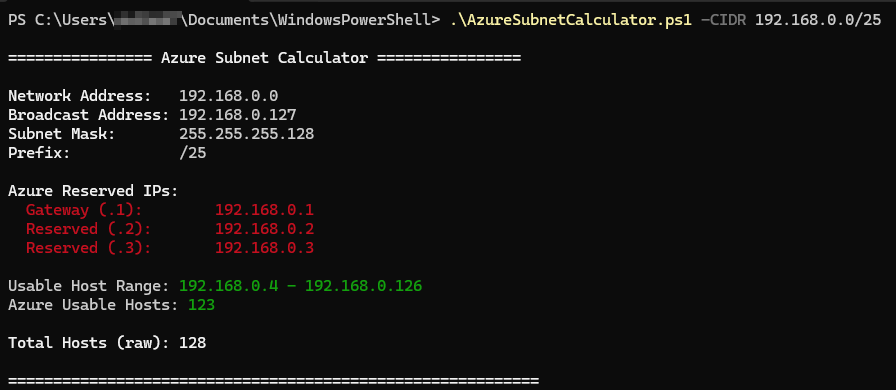
Basic subnet calculation:
./AzureSubnetCalculator.ps1 -CIDR 192.168.0.0/25
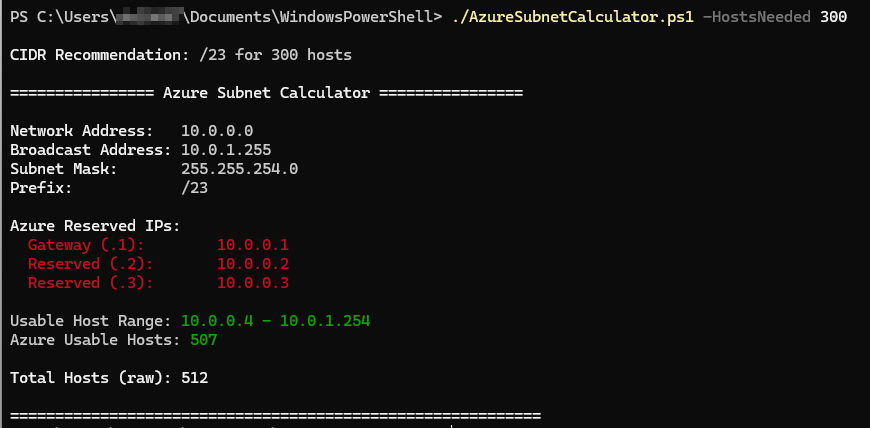
Azure-aware CIDR recommendation:
./AzureSubnetCalculator.ps1 -HostsNeeded 300
Split a subnet into four:
./AzureSubnetCalculator.ps1 -CIDR 10.5.0.0/22 -SplitSubnets 4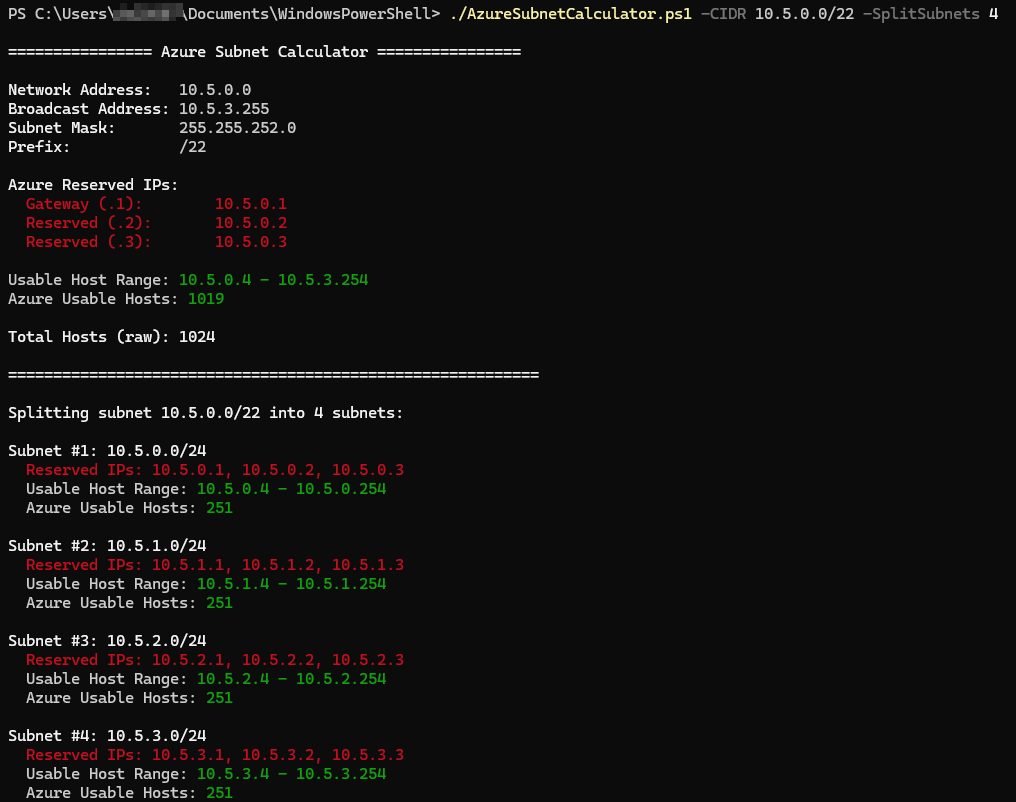
Examples of invalid and Azure no compliant CIDR:

License & Contribution
You are free to use, modify, and distribute this script. Pull requests, suggestions, and improvements are welcome!